
Register and Manage Kubernetes Sources
To start protecting Kubernetes, once you meet the requirements, you need to register the Kubernetes as a source.
You'll need to use a SaaS Connection (or create one) to connect with sources in your data center to establish connectivity between the sources and the Cohesity Cloud Protection Service.
To register your Kubernetes as a source:
-
In Cloud Protection Service, navigate to the Sources page and click + Register Source.
-
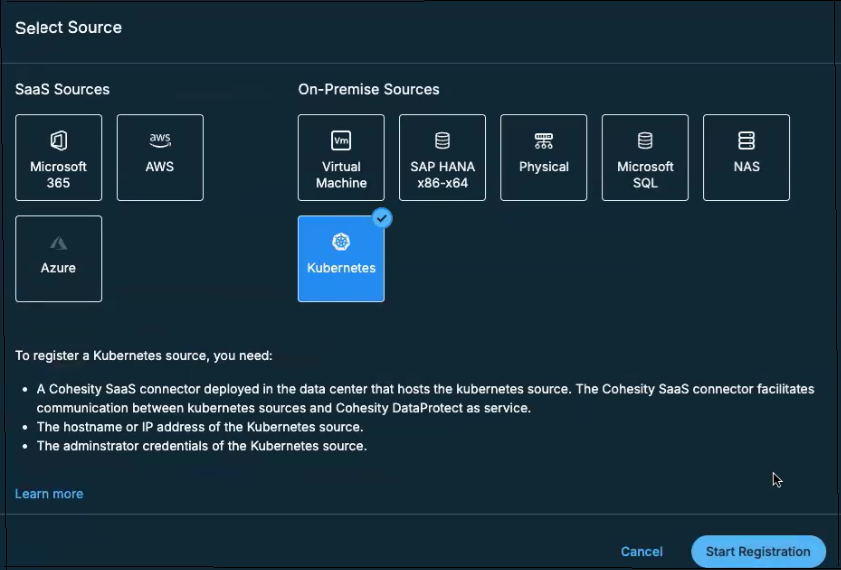
In the Select Source dialog box, select Kubernetes and click Start Registration.
-
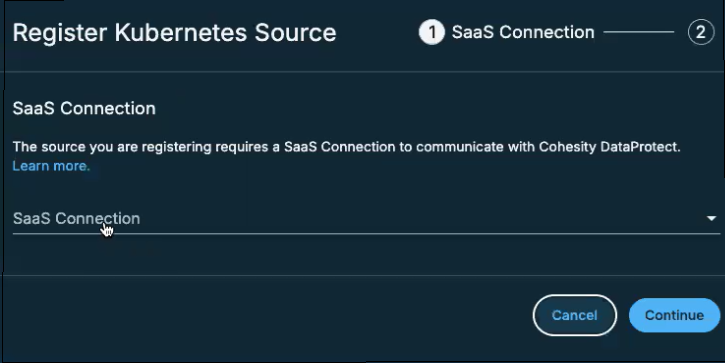
In the Register Kubernetes Source dialog box, select an existing healthy SaaS connection marked Unused, or click Create SaaS Connection, follow the instructions in Deploy SaaS Connection and then click Continue.
- In the Kubernetes Cluster Endpoint field, based on your requirements, enter the Kubernetes API Server endpoints in one of the following formats:
https://<FQDN>:<port_number>
IPv4
Format: https://<IPv4 address>:<port_number>
Example: https://10.14.58.2:6443
-
In the Password-Bearer Token field, enter the Bearer token ID of the Kubernetes service account. For information on obtaining the Bearer token ID, see Kubernetes Requirements.
-
From the Kubernetes Distribution drop-down, select one of the following Kubernetes distributions you want to backup and recover:
-
Mainline (Vanilla Kubernetes)
-
Redhat Openshift
- VMware Tanzu
-
-
Datamover Image: Enter the location where you have the Datamover image saved in your Docker registry. The image must be entered in the format:
<Image_name>:<TAG>.To protect the namespace level data in Vanilla Kubernetes 1.22 clusters, use the DataMover version that matches closely with your Cohesity cluster version. For more information, see Upgrade Velero and Datamover.
-
(Optional) Service Type: Enable this field to route external traffic to your Kubernetes cluster node via dedicated VLANs.
From the drop-down, select one of the following service types:
-
NodePort service type allows you to route external traffic through a fixed port (which you can set within the range of 30000-32767) on every Kubernetes node. In a NodePort setup, external traffic has direct access to the Kubernetes node.
-
Load Balancer service type allows you to route external traffic via an external Load Balancer functionality. Load Balancers monitor the availability of your Kubernetes pods and route incoming service requests to the relevant pods. In a Load Balancer setup, external traffic has access to the Kubernetes node through the Load Balancer only.
Service Annotation Key and Service Annotation Value
Enter the Service annotation key-value pairs. These key-value pairs are utilized to store metadata that offers information about the selected Kubernetes service that Cohesity deploys. This metadata does not affect the behavior of the Kubernetes cluster.
-
-
(Optional) Velero Image: Enter the location where you have the Velero image saved in your Docker registry. If you leave this field blank, then the Velero image will be pulled from a public image registry on the internet. You can download the Cohesity Velero Image from the Cohesity Downloads page.
You need Velero 1.8.1 to protect the namespace level data in Vanilla Kubernetes 1.22 clusters. For more information, see Upgrade Velero and Datamover.
-
(Optional) Velero AWS Plugin Image: Enter the location where you have the Velero plugin image for AWS saved in your Docker registry. If you leave this field blank, then the Velero plugin image for AWS will be pulled from a public image registry on the internet. You can download the Cohesity Velero AWS Plugin Image from the Cohesity Downloads page.
-
(Optional) Init Container Image: Enter the location where you have the Init Container image saved in your Docker registry. If you leave this field blank, then Cohesity will use the Datamover image as the Init Container image.
-
Click Complete.
Post-Registration Task
Once you register the Kubernetes source, perform the following actions:
-
Run the following command to view the ports associated with each node of the Kubernetes cluster.
kubectl get services -n cohesity-<cluster-id>
Ensure the ports associated with the nodes are open to enable communication between the Kubernetes cluster and the Cohesity cluster.
-
Verify all of the pods in the Kubernetes cluster are in running state by running the following command:
kubectl get pods -n cohesity-<cluster-id>
The namespaces are displayed on the Sources page of the Cohesity Dashboard only after all the pods are either in the running state or error state.
Refresh the Kubernetes source if there is an error on the source page. For more information, see Refresh the Kubernetes Source.
Update the Kubernetes Source
You can update the registered Kubernetes source to add or remove the Kubernetes sources protected by the Cohesity Cloud Protection Service from your Kubernetes source.
To edit the Kubernetes source configuration:
-
In Cloud Protection Service, navigate to Sources.
-
Click the Actions menu (⋮) next to the Kubernetes sources and select Edit.
-
In the Edit Kubernetes Source form, select or unselect the Kubernetes source and click Continue to update.
Refresh the Kubernetes Source
You can refresh the Kubernetes and fetch the latest changes on the Kubernetes source.
To refresh the Kubernetes source configuration:
-
In Cloud Protection Service, navigate to Sources.
-
Click the Actions menu (⋮) next to the Kubernetes sources and select Refresh.
Unregister Kubernetes Source
If you plan to stop taking the backup of your Kubernetes source namespace, you can unregister the Kubernetes source from the Cohesity Cloud Protection Service.
To unregister the Kubernetes source:
-
In Cloud Protection Service, navigate to Sources.
-
Click the Actions menu (⋮) next to the Kubernetes sources and select Unregister
Next > You're ready to protect your Kubernetes Sources, PVCs, and Namespaces!
