
About Copilot User Interface
Copilot integrates seamlessly into Cohesity Data Cloud, offering an intuitive experience that enhances the overall user experience. Accessing Copilot is as simple as clicking an icon in the Cohesity Data Cloud user interface.
To launch Copilot:
-
Log in to Cohesity Data Cloud.
-
Click the Copilot icon:
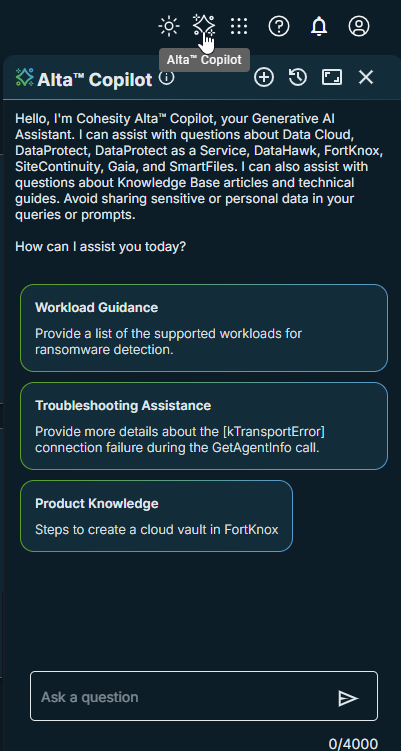
Copilot opens, and you can either begin typing your question in the chat window or select one of the assistive prompts to help guide your interaction.
The following are the UI options:
Option Task 
Start a new conversation 
View chat history 
Expand the Copilot user interface 
Collapse the Copilot user interface 
Close the Copilot user interface
Converse With Copilot
Copilot is available to all users of Cohesity Data Cloud. Click the Copilot icon to start a chat.
You can either type your question directly into the chat window or choose from the assistive prompts provided. Copilot processes your query and gives a relevant response.
You can provide feedback by using the thumbs up or thumbs down buttons. Additionally, Copilot includes source references within its responses, allowing you to access relevant resources.
After delivering an answer, Copilot offers assistive prompts to help guide the conversation and keep the conversation focused.
